
There is already an anti camp tutorial if curious, here is the article for a different anti camp here: Anti Camp (Signal wired) - However, i use counters for the way i do anti camp without having to use signal wired for it. And it is more suitable and efficient for games that have a queue.
2x Wired effect: teleport to furni
3x Wired effect: control counter
1x Wired trigger: user walks off furni
1x Wired selector: users in area
1x Wired trigger: counter reaches set time
1x Counter
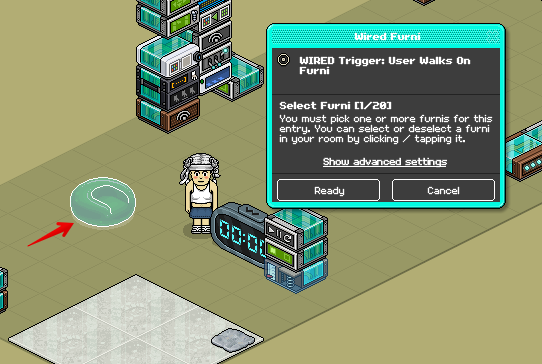
If you have a queue, and if your furni is a color tile at the start or any furni, you would need to use the following stack to ensure that the counter will start upon someone teleporting into the game. In my case, you can pretend that my green pod is the start of the queue which in this case i will select the green pod. In this wired select the furni where the user is standing or sittong on. Press Ready.
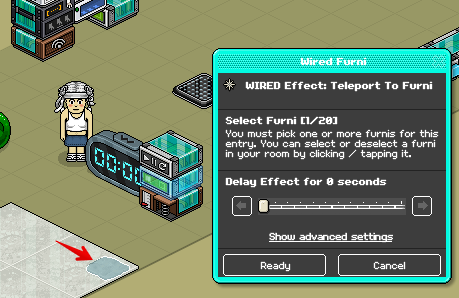
Now in the Wired Effect: teleport to furni you will have to select the furni where they teleport to after sitting on the green pod. I will select the pile of slate, then press Ready.
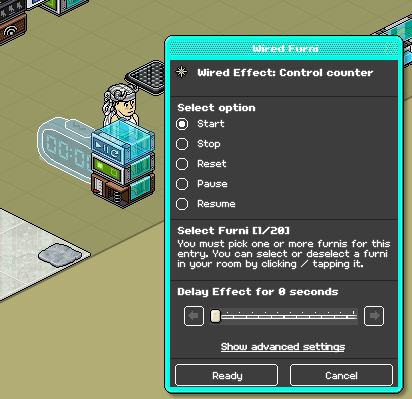
With this Wired Effect: control counter you will then select the counter, press Ready after. Once you have done all of this, then you can put the 3 wireds on each other like i have.
In the Wired Trigger: user walks off furni, select the furni where the user teleports to. In my case it is the pile of slate. So if they walk off that furni, then the counter will reset itself so that the user will not be bopped accidently. Press Ready.
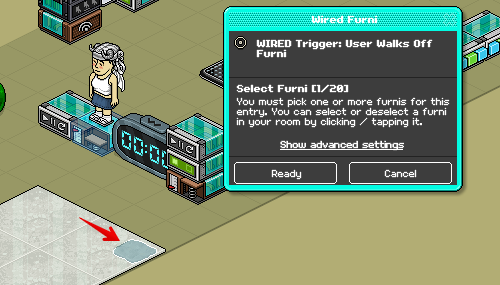
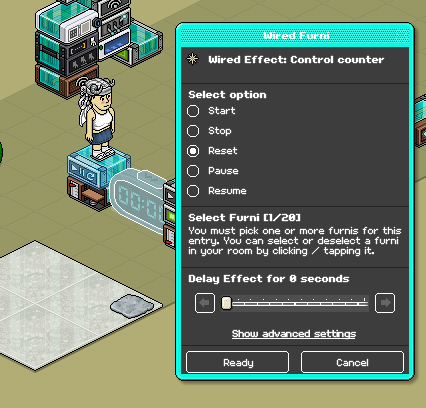
With the Wired Effect: control counter, you select the counter and then tick the option reset or stop depending on which you want to use since it does not really matter that much. Press Ready after that, now just stack the 2 wireds on top of each other when done.
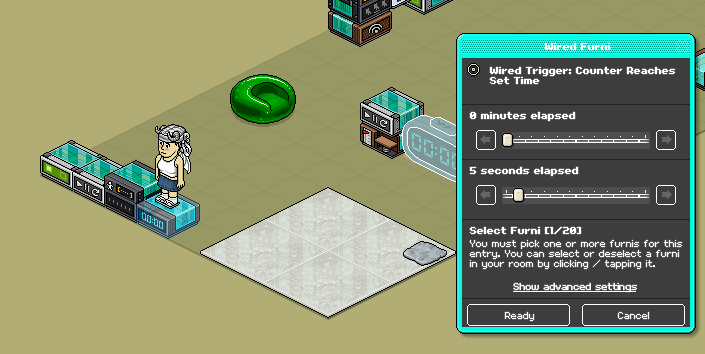
In the Wired Trigger: counter reaches time, you have to select either the minutes or seconds that you want to use. I will use 5 seconds just as an example, you need to select the counter within this wired as well. Press Ready after.
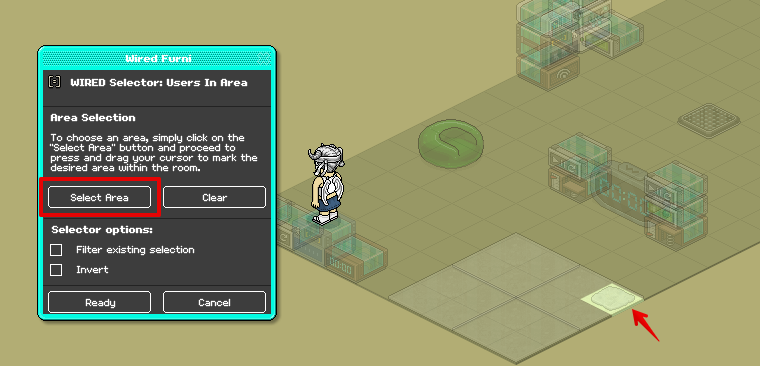
In the Wired Selector: users in area, first click on 'select area' then select the area where the user is standing if they are camping on the furni where they teleport to when the game starts. In my case that will be the pile of slate.
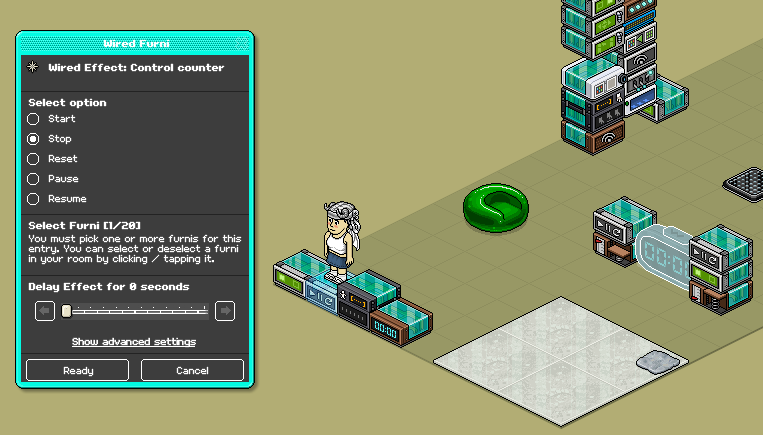
With the Wired Effect: control counter, select the counter and tick either reset or stop as it doesn't matter which one you pick.
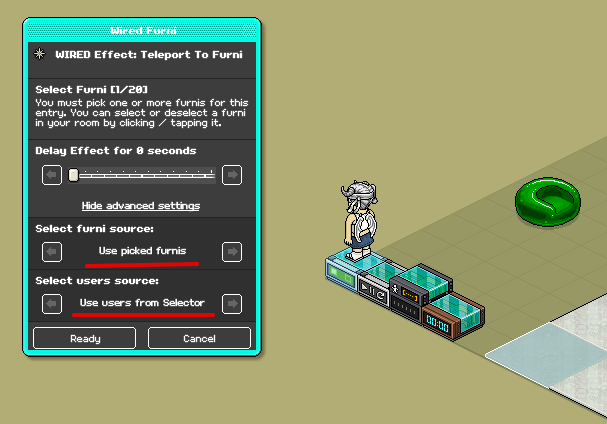
Lastly, click the Wired Effect: teleport to furni and click on advanced settings within that wired to show more options. Then use the options like i have to make this work. Select the furni you want them to teleport to after the timer has reached 5 seconds. In my case that will be the white marble floor. Press Ready after.
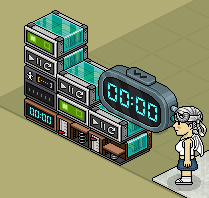
It should then look like this once all the wired is done.

The wired you will need:
1x Wired trigger: user walks on furni2x Wired effect: teleport to furni
3x Wired effect: control counter
1x Wired trigger: user walks off furni
1x Wired selector: users in area
1x Wired trigger: counter reaches set time
1x Counter
Step 1
If you have a queue, and if your furni is a color tile at the start or any furni, you would need to use the following stack to ensure that the counter will start upon someone teleporting into the game. In my case, you can pretend that my green pod is the start of the queue which in this case i will select the green pod. In this wired select the furni where the user is standing or sittong on. Press Ready.
Now in the Wired Effect: teleport to furni you will have to select the furni where they teleport to after sitting on the green pod. I will select the pile of slate, then press Ready.
With this Wired Effect: control counter you will then select the counter, press Ready after. Once you have done all of this, then you can put the 3 wireds on each other like i have.
Step 2
In the Wired Trigger: user walks off furni, select the furni where the user teleports to. In my case it is the pile of slate. So if they walk off that furni, then the counter will reset itself so that the user will not be bopped accidently. Press Ready.
With the Wired Effect: control counter, you select the counter and then tick the option reset or stop depending on which you want to use since it does not really matter that much. Press Ready after that, now just stack the 2 wireds on top of each other when done.
Step 3
In the Wired Trigger: counter reaches time, you have to select either the minutes or seconds that you want to use. I will use 5 seconds just as an example, you need to select the counter within this wired as well. Press Ready after.
In the Wired Selector: users in area, first click on 'select area' then select the area where the user is standing if they are camping on the furni where they teleport to when the game starts. In my case that will be the pile of slate.
With the Wired Effect: control counter, select the counter and tick either reset or stop as it doesn't matter which one you pick.
Lastly, click the Wired Effect: teleport to furni and click on advanced settings within that wired to show more options. Then use the options like i have to make this work. Select the furni you want them to teleport to after the timer has reached 5 seconds. In my case that will be the white marble floor. Press Ready after.
GIF Example:
It should then look like this once all the wired is done.
 Kate 2 years ago
 prespects 2 years ago
 Rotating 2 years ago