
This one is rather simple and it only requires you to have 4 wired boxes in total. In this wired tutorial you can see what you will need to teleport a person or more from the user by name selector without it being interrupted when someone enters the room that is not in the selector.
1x Wired Triggerer: User enters room
1x Wired Selector: Users by name
1x Wired Condition: Triggerer Matches
1x Wired Effect: Teleport to furni
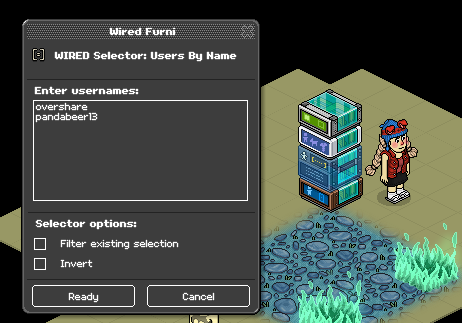
The Wired triggerer: Users enters room is common sense since you don't have to change anything about that one. But the Wired Selector: Users by name, you will just have to type that user's username into the box and press ready. It can be a lot of users as long as you put each username in a new line. Press ready after done.
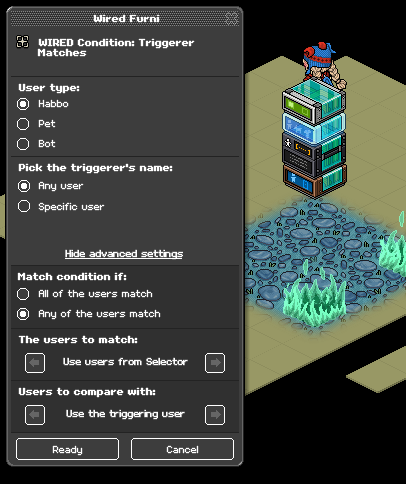
The Wired Condition: Triggerer Matches is to ensure that only the people or person will teleport upon entering the room to the furni. So for example, if a random user enters the room that will mean that the people from the selector will not teleport since they don't match the condition and it's good to use for checkpoints too! Press ready after done.
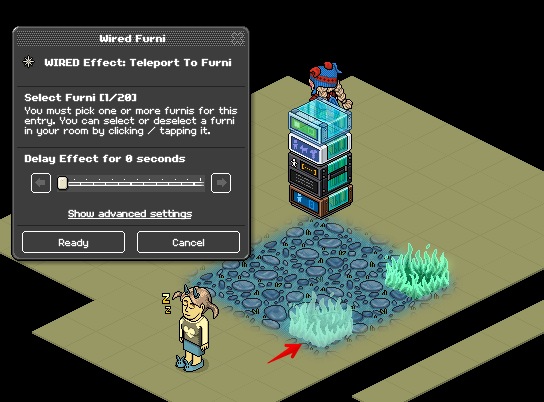
For the Wired effect: Teleport to furni you will just have to click the box and select the furni that you want people to teleport to when they enter the room. In my case i have selected the fire. Then press ready once done.
The wireds needed:
1x Wired Triggerer: User enters room
1x Wired Selector: Users by name
1x Wired Condition: Triggerer Matches
1x Wired Effect: Teleport to furni
Step 1
The Wired triggerer: Users enters room is common sense since you don't have to change anything about that one. But the Wired Selector: Users by name, you will just have to type that user's username into the box and press ready. It can be a lot of users as long as you put each username in a new line. Press ready after done.
Step 2
The Wired Condition: Triggerer Matches is to ensure that only the people or person will teleport upon entering the room to the furni. So for example, if a random user enters the room that will mean that the people from the selector will not teleport since they don't match the condition and it's good to use for checkpoints too! Press ready after done.
Step 3
For the Wired effect: Teleport to furni you will just have to click the box and select the furni that you want people to teleport to when they enter the room. In my case i have selected the fire. Then press ready once done.
 Rotating 2 years ago
 Kate 2 years ago