
In this simple wired tutorial i will show you how you can mute people in a certain area in the room with only using 3 wireds! You will need the following wireds:
1x Wired Condition: Triggerer Matches
1x Wired Selector: Users in area
1x Wired Trigger: Users says keyword
Or in case you don't want to read what you will need, here is a screenshot of the wireds put in the room:

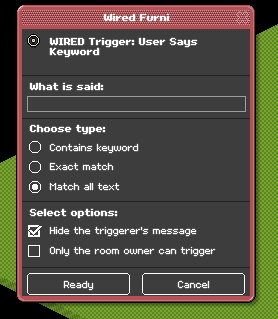
Click on your Wired Trigger: Users says keyword and make sure you have put the same settings as mine.
Click on your Wired Selector: Users in area and select the area that you want people to be muted in your room.
Example GIF below:

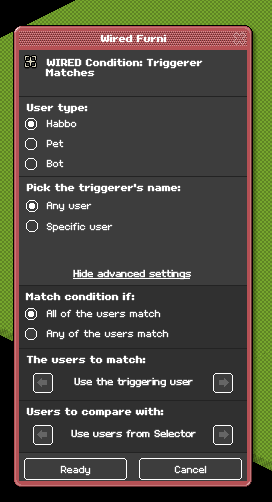
Click on your Wired Condition: Triggerer matches and make sure you have put the same settings as mine.
Now your stack is ready to be used and being able to mute people in your room. In my case when i received the whispering bubble as shown in the GIF below that means i am not able to talk in the room.
Example GIF below:

1x Wired Condition: Triggerer Matches
1x Wired Selector: Users in area
1x Wired Trigger: Users says keyword
Or in case you don't want to read what you will need, here is a screenshot of the wireds put in the room:
Step 1
Click on your Wired Trigger: Users says keyword and make sure you have put the same settings as mine.
Step 2
Click on your Wired Selector: Users in area and select the area that you want people to be muted in your room.
Example GIF below:
Step 3
Click on your Wired Condition: Triggerer matches and make sure you have put the same settings as mine.
Result:
Now your stack is ready to be used and being able to mute people in your room. In my case when i received the whispering bubble as shown in the GIF below that means i am not able to talk in the room.
Example GIF below:
 Nexus 1 year ago
 Dani 1 year ago
 Keegan 1 year ago