
Always wanted to make your own Auto Run well this guide will give you the step by step instructions on how to do so!
14x Wried Trigger: User Walks On furni
3x Wired Trigger: User Says Keyword
2x Wired Trigger: Repeat Effect
1x Wired Trigger: Furni State Is Changed
1x Wired Trigger: User Stuff Collision
1x Wired Trigger: Game Ends
1x Wired Trigger: Game starts
7x Wired Effect: Match Furni To Position & State
6x Wired Effect: Teleport To Furni
2x Wired Effect Toggle Furni
2x Wired Effect Change Furni Direction
2x Wired Effect: Move & Rotate Furni
1x Wired Condition: Furni States & Position Match
2x Counters
1x Tile
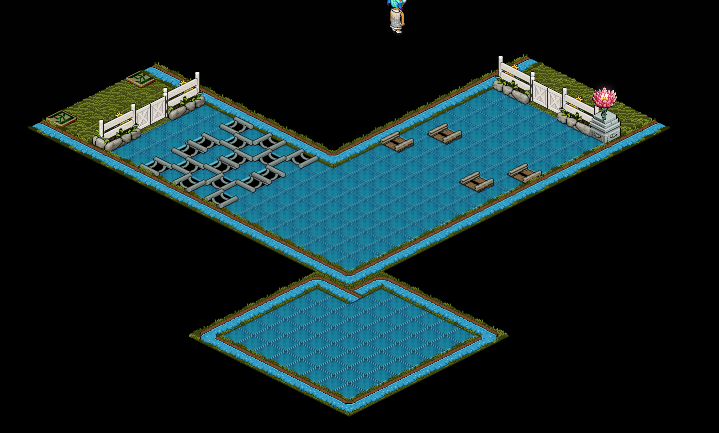
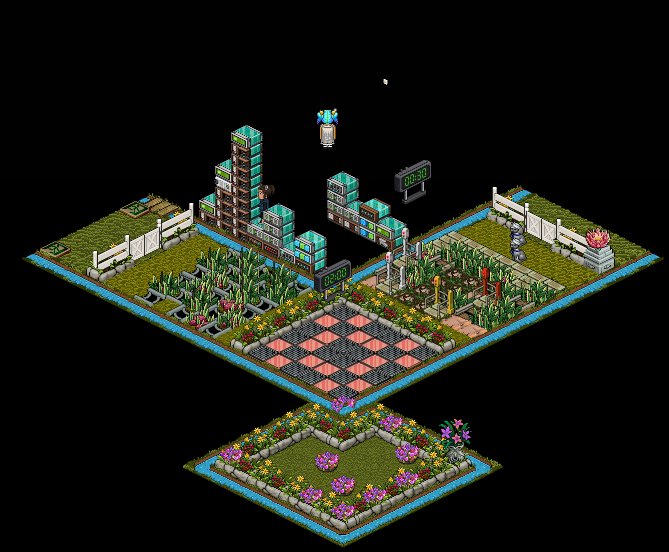
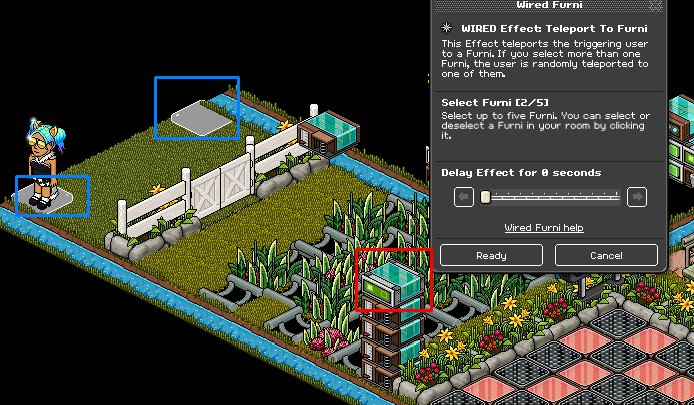
The first step is to set up the entrance so if you have a large crowd people can still enter. For this you will need 1x Wired Trigger: User Walks On Furni & 1x Wired Effect: Teleport To Furni set up as shown below.

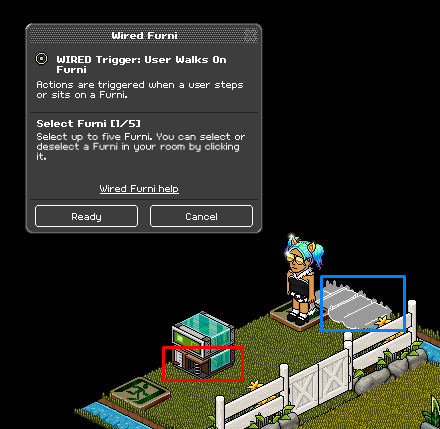
A) Click on the Wired Trigger: User Walks On furni and select the ditch that is open, this can be left open.
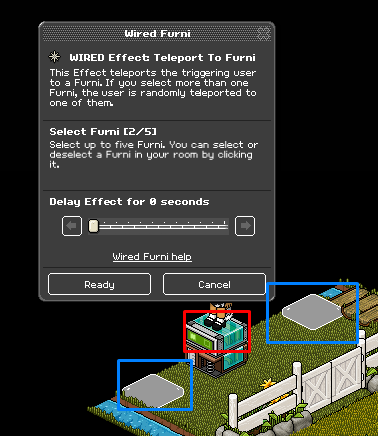
B) Click on the Wired Effect: Teleport To Furni and select the exit tiles in the waiting area.
The next step is to set up the rollers so if they are walked on when the torch/light is off they will be teleported back. For this you will need 4x Wired Trigger: User Walks On Furni, 1x Wired Condition: Furni States Position & Match and 1x Wired Effect Teleport To Furni set up as shown below.
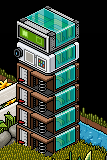
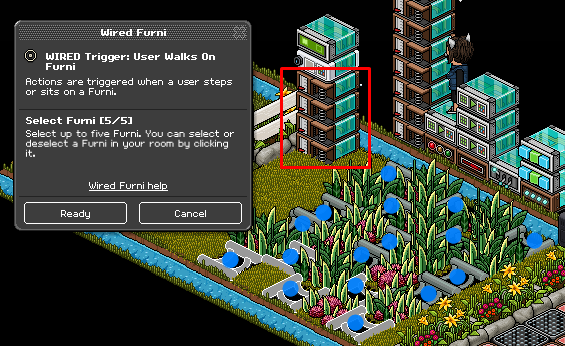
A) Click the Wired Trigger: User Walks On Furni’s and select the rollers in the first section and the final game.
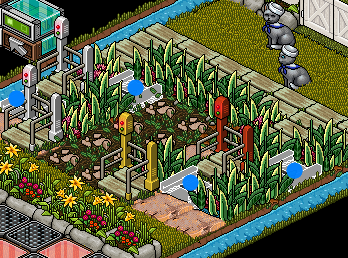
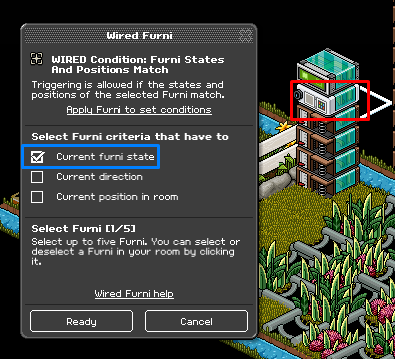
B) Click the Wired Condition: Furni States Position & Match and select your light/torch. Make sure it is turned off. Then select Current Furni State.
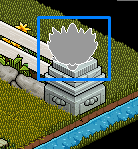
C) Click the Wired Effect: Teleport To Furni and select the two exit tiles in the waiting area.
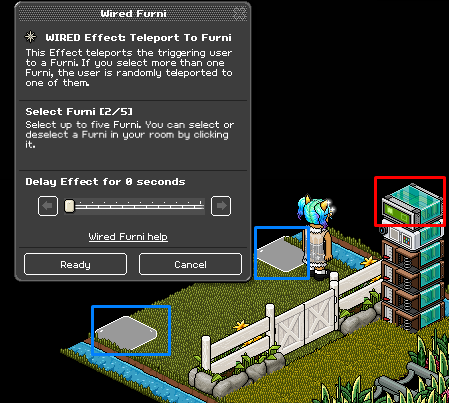
This step is to wire the Duck Grass so if that a player walks on it they will be sent back to the waiting area. For this you will need 3x Wired Trigger: User Walks On Furni & 1x Wired Effect: Teleport To Furni set up as shown below.

A) Using the Wired Trigger: User Walks On Furni’s select all the Duck Grass with a blue dot.
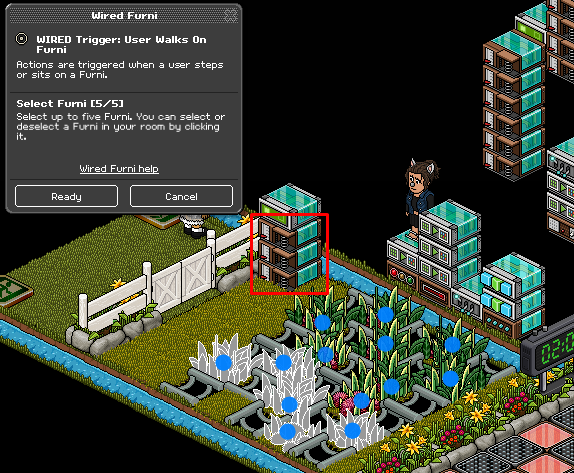
B) Using the Wired Effect: Teleport To Furni select the two exit tiles in the waiting area.
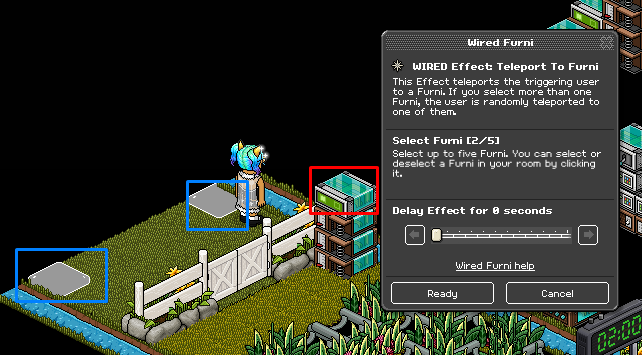
C) Once a player has gotten safely across the tracks without stepping on the Duck Grass you will need 1x Wired Trigger: User Walks On furni & 1x Wired Effect Teleport To Furni set up as shown below.

D) Click on the Wired Trigger: User Walks On Furni’s and select the Grass Blocks with a blue dot on them.
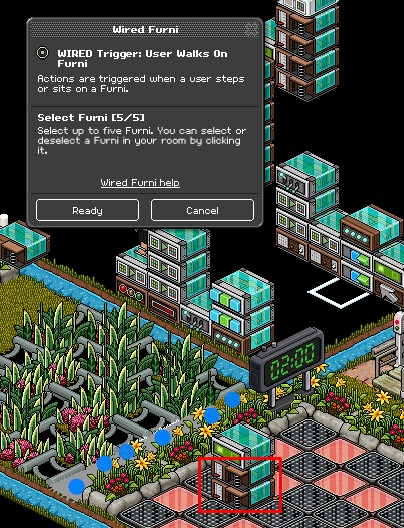
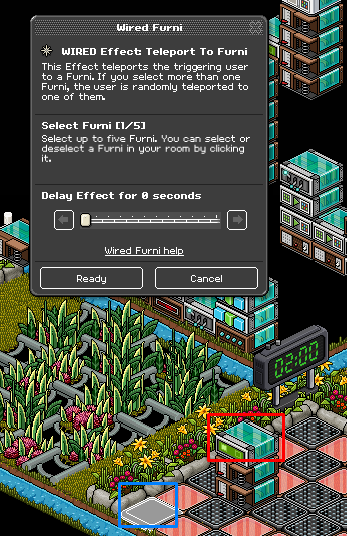
E) Using the Wired Effect: Teleport To Furni select one of the Banzai’s where the red tiles are.
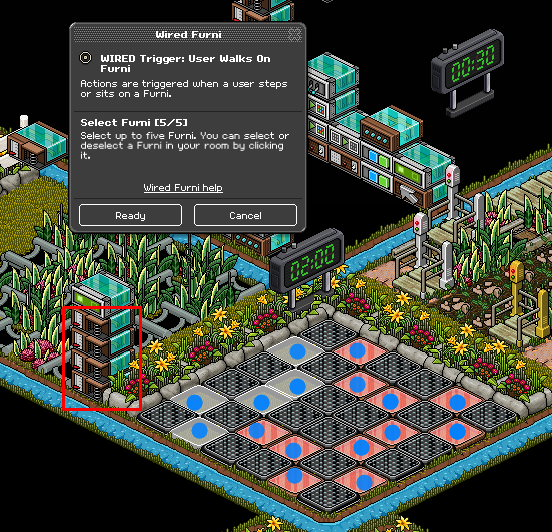
In this step we are going to set up the next section of the Auto Run which is the Banzai section for this you will need 4x Wired Trigger: User Walks On Furni & 1x Wired Effect: Teleport To Furni set up as shown below.
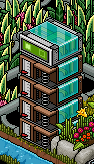
A) Using the Wired Trigger: User Walks On Furni’s select all the red tiles.
B) Using the Wired Effect: Teleport To Furni select the two exit tiles in the waiting area.
This step is to create the set up for the Lei’s section of the Auto Run. For this you will need 2x Wired Effect: Move & Rotate Furni, 1x Wired Trigger Repeat Effect, 1x Wired Trigger: Furni State Is Changed and 1x Wired Effect: Teleport To Furni set up as shown below.
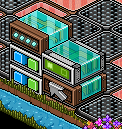
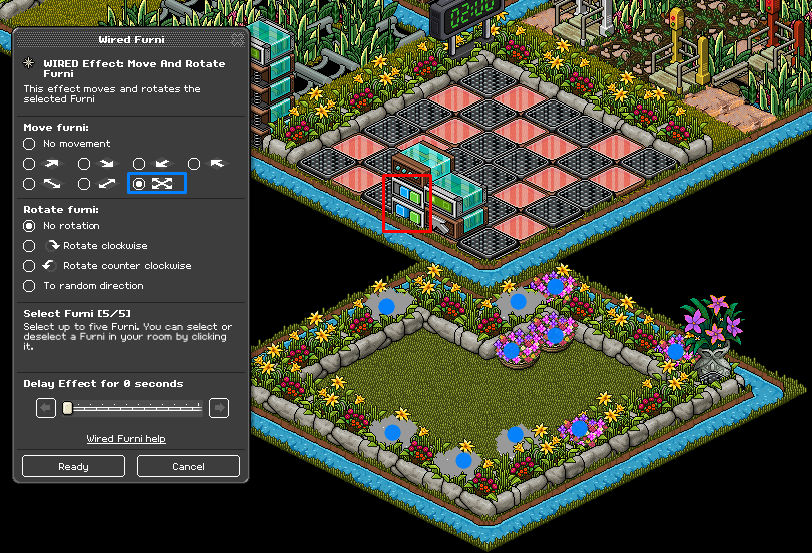
A) Using the Wired Effect: Move & Rotate Furni’s select all the Lei’s in the section and select the move all around option as shown below.
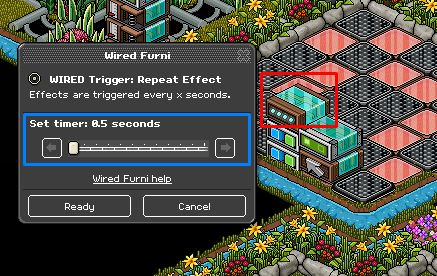
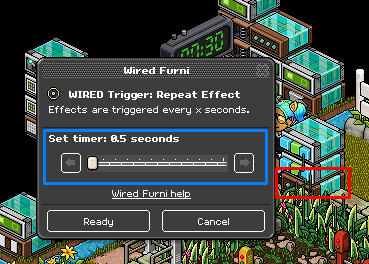
B) Using the Wired Trigger: Repeat Effect set it to 0.5 seconds this will make the Lei’s move around the are.
C) Using the Wired Trigger: Furni State Is Changed select one of the Lei’s, this will be the one they have to find to move on to the next level.
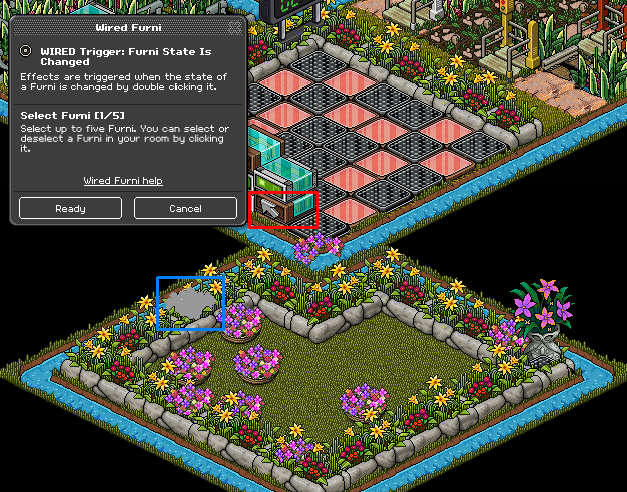
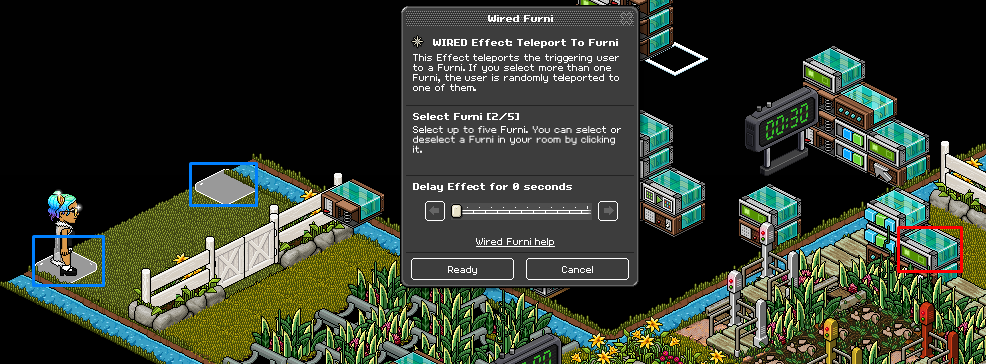
D) Using the Wired Effect: Teleport To Furni select 2 of the grass blocks at the next section.
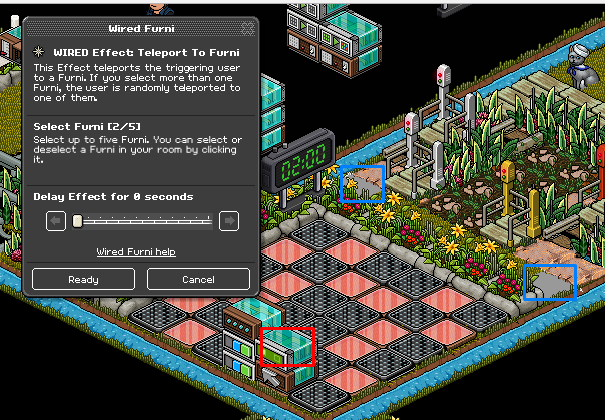
In this section we are going to set up the One-Way Gates part of the game. For this you will need 3x Wired Trigger: User Walks On Furni & 1x Wired Effect: Teleport To Furni set up as shown below.
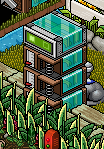
A) Using the Wired Trigger: User Walks On Furni’s select all the Duck Grass in this section.
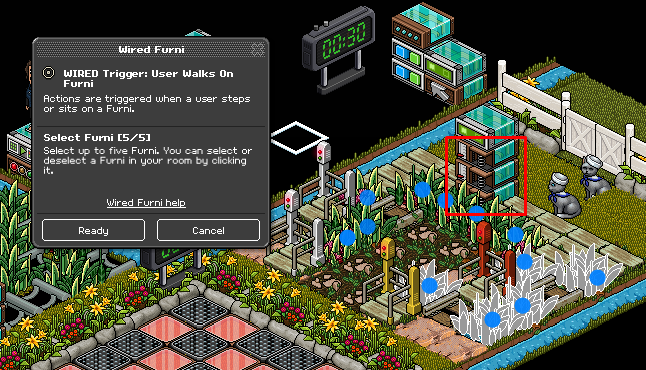
B) Using the Wired Effect: Teleport To Furni select the two Exit Tiles in the waiting area.
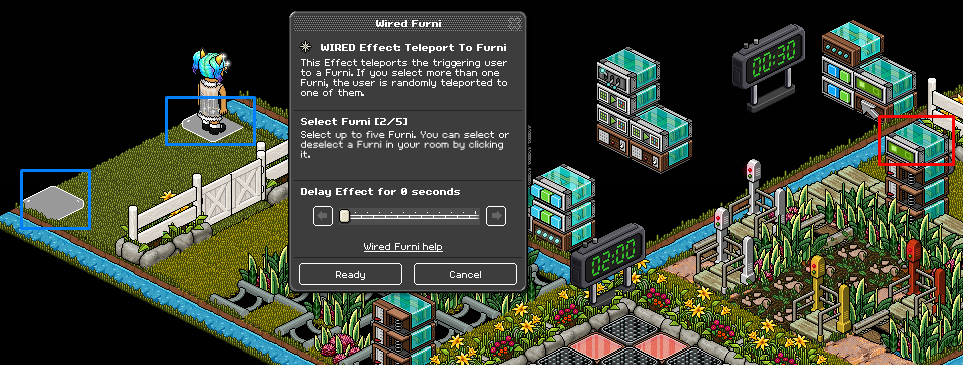
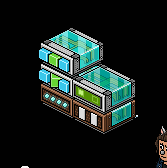
For the last section of the Auto Run you will need 1x Wired Trigger: Repeat Effect, 2x Wired Effect: Change Furni direction, 1x Wired Trigger User Stuff Collision & 1x Wired Effect: Teleport To Furni set up as shown below.
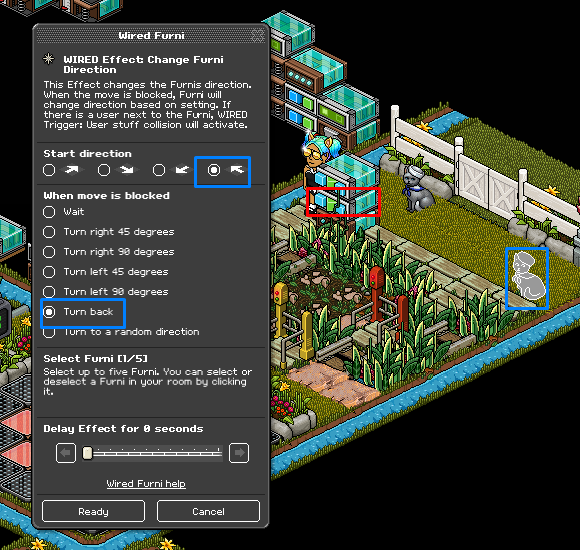
A) Select the first Wired Effect: Change Furni Direction and select one of the first cat. Select the arrow shown below and the option to go back.
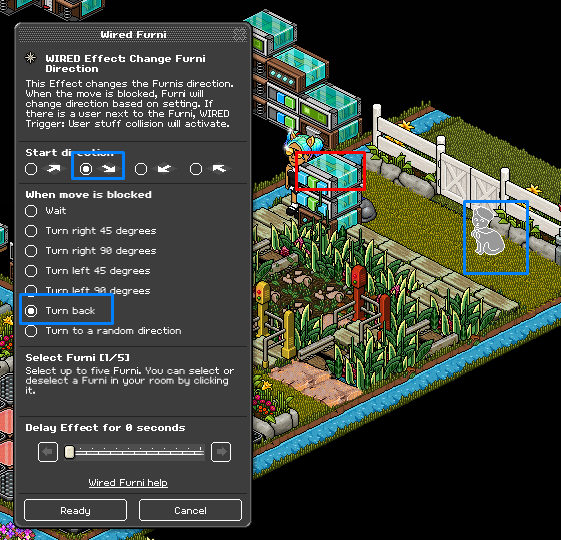
B) Complete the second cat using the second Wired Effect: Change Furni Direction but clicking the opposite arrow and still selecting the option to turn back.
C) Using the Wired Trigger: Repeat Effect and set it to 0.5 seconds.
D) Using the Wired Effect: Teleport To Furni select the two Exit Tiles in the waiting area.
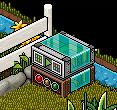
Now you have completed all the game challenges it is not time to set up the starting of the game. For this, you will need 1X Wired Trigger: Game Starts and 1x Wired Effect: Match Furni To Position And State set up as shown below.
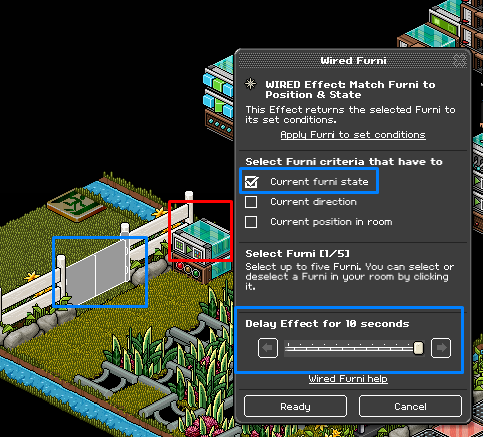
A) Using the Wired Effect: Match Furni To Position & State click on the gate where the waiting area is and put a delay of 10 seconds.
In this step I am going to show you how to set up the wired to end the game when the timer has finished. For this you will need 1x Wired Trigger: Game Ends, 3x Wired Effect: Match Furni To Position & State and 1x Wired Effect: Toggle furni state set up as shown below.
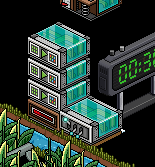
A) Using the first Wired Effect: Match Furni To Position & State and select all the gates and the torch/light. Make sure the gates are closed and the light/torch is set to off and click
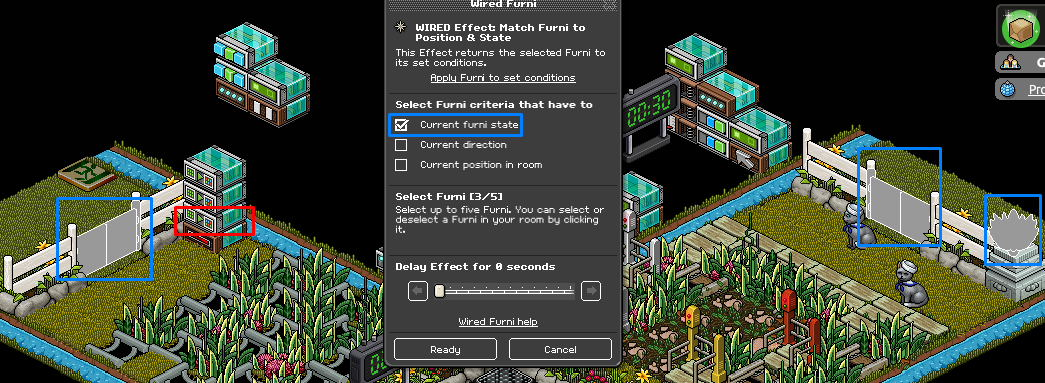
B) Using the second Wired Effect: Match Furni To Position & State select the two items you are using, in this case, I am using cats and click Position In Room.
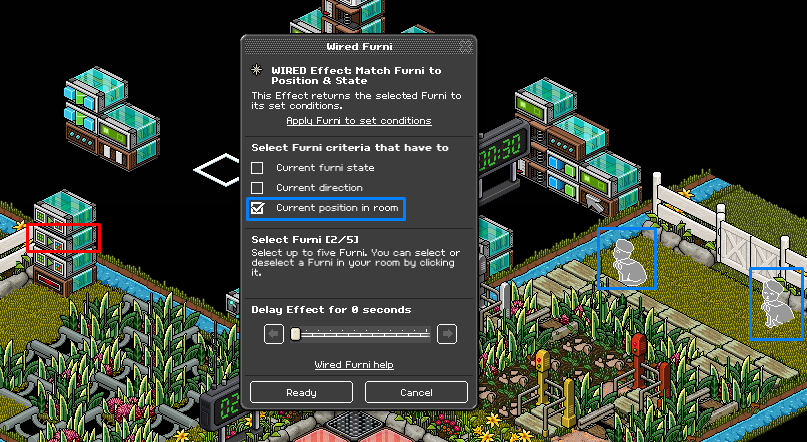
C) Using the third Wired Effect: Match Furni To Position & State select the Wired Effect: Toggle Furni State and place it next to this stack.
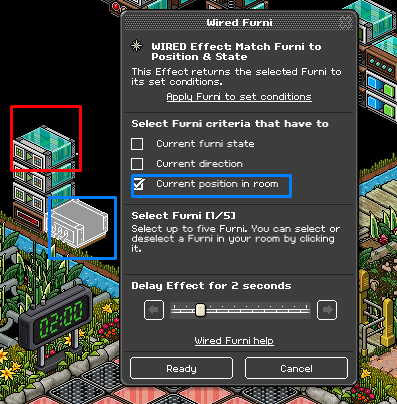
Note: It is easier to put the Wired Effect: Toggle Furni State on top of a 1x1 tile.
D) Using the Wired Effect: Toggle Furni State and click the timer that has 30 seconds on it.
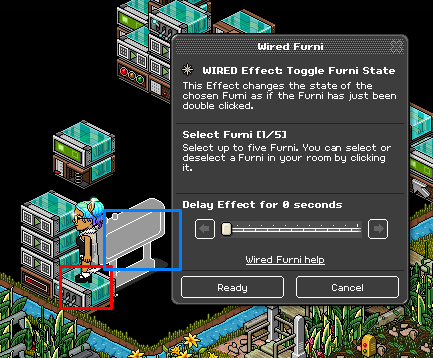
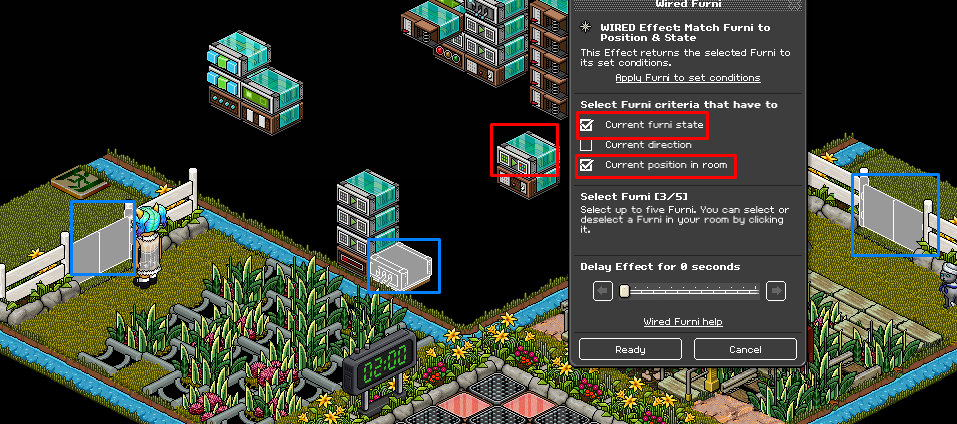
This part of the guide is going to show you how to start the game. For this you will need 1x Wired Trigger: User Says Keyword, 3x Wired Effect: Match Furni To Position & State and 1x Wired Trigger: Toggle Furni State set up as shown below.
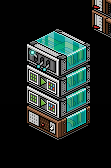
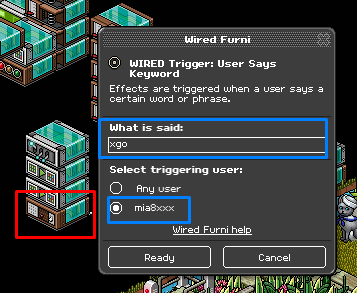
A) Using the Wired Trigger: User Says Keyword use a keyword that will be easier to remember for you and set it so only you can say it.
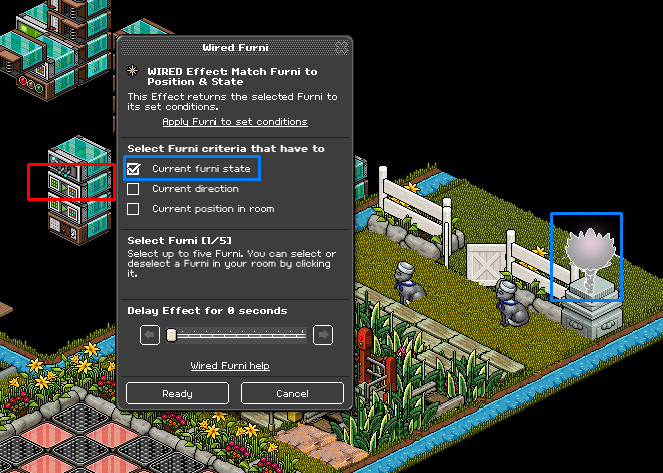
B) Using the first Wired Effect: Match Furni To Position & State select the gates at the beginning and the end of the Auto Run and the Wired Effect: Toggle Furni State is placed on the Game Ends Stack, select current position in room and current furni state.
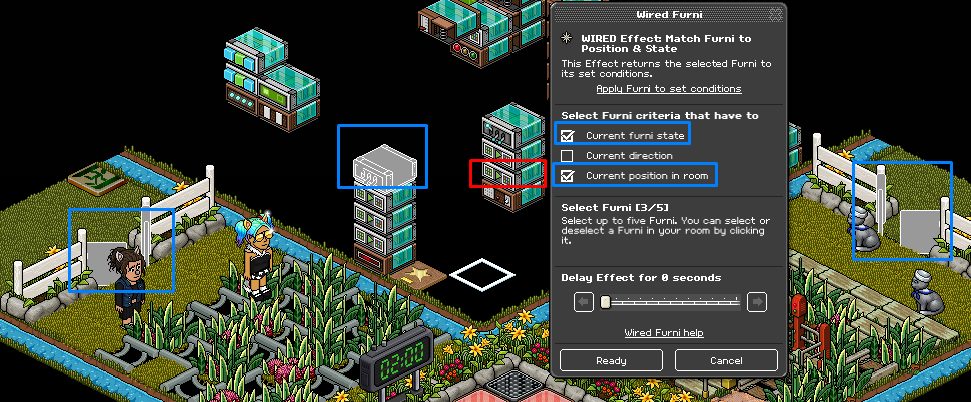
C) Using the second Wired Effect: Match furni To Position & State, select your light/torch and make sure it is lit select current furni state.
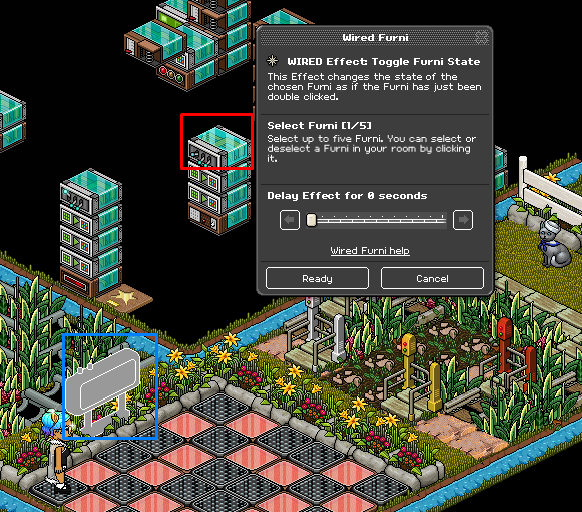
D) Using the Wired Effect: Toggle Furni State select the counter with the 2-minute timer on it.
Finally, you will need to set up your reset wired. For this you will need 1x Wired Trigger: User Says Keyword and 1x Wired Effect: Match Furni To Position & State set up as shown below.
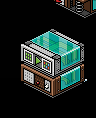
A) Using the Wired Trigger: User Says Keyword set it to a word you will remember also make sure it is set to only you.
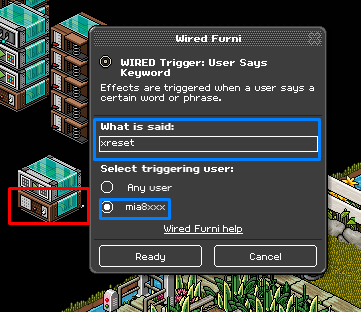
B) Using the Wired Effect: Match Furni To Position & State and click the gates at the beginning and the end of the Auto Run make sure they are closed and select current furni state. Also select the Wired Effect: Toggle Furni State from the Game Ends stack and place it on top of the tile and select current position in room.
What You Will Need
14x Wried Trigger: User Walks On furni
3x Wired Trigger: User Says Keyword
2x Wired Trigger: Repeat Effect
1x Wired Trigger: Furni State Is Changed
1x Wired Trigger: User Stuff Collision
1x Wired Trigger: Game Ends
1x Wired Trigger: Game starts
7x Wired Effect: Match Furni To Position & State
6x Wired Effect: Teleport To Furni
2x Wired Effect Toggle Furni
2x Wired Effect Change Furni Direction
2x Wired Effect: Move & Rotate Furni
1x Wired Condition: Furni States & Position Match
2x Counters
1x Tile
Example Room Layout
Step 1
The first step is to set up the entrance so if you have a large crowd people can still enter. For this you will need 1x Wired Trigger: User Walks On Furni & 1x Wired Effect: Teleport To Furni set up as shown below.
A) Click on the Wired Trigger: User Walks On furni and select the ditch that is open, this can be left open.
B) Click on the Wired Effect: Teleport To Furni and select the exit tiles in the waiting area.
Step 2
The next step is to set up the rollers so if they are walked on when the torch/light is off they will be teleported back. For this you will need 4x Wired Trigger: User Walks On Furni, 1x Wired Condition: Furni States Position & Match and 1x Wired Effect Teleport To Furni set up as shown below.
A) Click the Wired Trigger: User Walks On Furni’s and select the rollers in the first section and the final game.
B) Click the Wired Condition: Furni States Position & Match and select your light/torch. Make sure it is turned off. Then select Current Furni State.
C) Click the Wired Effect: Teleport To Furni and select the two exit tiles in the waiting area.
Step 3
This step is to wire the Duck Grass so if that a player walks on it they will be sent back to the waiting area. For this you will need 3x Wired Trigger: User Walks On Furni & 1x Wired Effect: Teleport To Furni set up as shown below.
A) Using the Wired Trigger: User Walks On Furni’s select all the Duck Grass with a blue dot.
B) Using the Wired Effect: Teleport To Furni select the two exit tiles in the waiting area.
C) Once a player has gotten safely across the tracks without stepping on the Duck Grass you will need 1x Wired Trigger: User Walks On furni & 1x Wired Effect Teleport To Furni set up as shown below.
D) Click on the Wired Trigger: User Walks On Furni’s and select the Grass Blocks with a blue dot on them.
E) Using the Wired Effect: Teleport To Furni select one of the Banzai’s where the red tiles are.
Step 4
In this step we are going to set up the next section of the Auto Run which is the Banzai section for this you will need 4x Wired Trigger: User Walks On Furni & 1x Wired Effect: Teleport To Furni set up as shown below.
A) Using the Wired Trigger: User Walks On Furni’s select all the red tiles.
B) Using the Wired Effect: Teleport To Furni select the two exit tiles in the waiting area.
Step 5
This step is to create the set up for the Lei’s section of the Auto Run. For this you will need 2x Wired Effect: Move & Rotate Furni, 1x Wired Trigger Repeat Effect, 1x Wired Trigger: Furni State Is Changed and 1x Wired Effect: Teleport To Furni set up as shown below.
A) Using the Wired Effect: Move & Rotate Furni’s select all the Lei’s in the section and select the move all around option as shown below.
B) Using the Wired Trigger: Repeat Effect set it to 0.5 seconds this will make the Lei’s move around the are.
C) Using the Wired Trigger: Furni State Is Changed select one of the Lei’s, this will be the one they have to find to move on to the next level.
D) Using the Wired Effect: Teleport To Furni select 2 of the grass blocks at the next section.
Step 6
In this section we are going to set up the One-Way Gates part of the game. For this you will need 3x Wired Trigger: User Walks On Furni & 1x Wired Effect: Teleport To Furni set up as shown below.
A) Using the Wired Trigger: User Walks On Furni’s select all the Duck Grass in this section.
B) Using the Wired Effect: Teleport To Furni select the two Exit Tiles in the waiting area.
Step 7
For the last section of the Auto Run you will need 1x Wired Trigger: Repeat Effect, 2x Wired Effect: Change Furni direction, 1x Wired Trigger User Stuff Collision & 1x Wired Effect: Teleport To Furni set up as shown below.
A) Select the first Wired Effect: Change Furni Direction and select one of the first cat. Select the arrow shown below and the option to go back.
B) Complete the second cat using the second Wired Effect: Change Furni Direction but clicking the opposite arrow and still selecting the option to turn back.
C) Using the Wired Trigger: Repeat Effect and set it to 0.5 seconds.
D) Using the Wired Effect: Teleport To Furni select the two Exit Tiles in the waiting area.
Step 8
Now you have completed all the game challenges it is not time to set up the starting of the game. For this, you will need 1X Wired Trigger: Game Starts and 1x Wired Effect: Match Furni To Position And State set up as shown below.
A) Using the Wired Effect: Match Furni To Position & State click on the gate where the waiting area is and put a delay of 10 seconds.
Step 9
In this step I am going to show you how to set up the wired to end the game when the timer has finished. For this you will need 1x Wired Trigger: Game Ends, 3x Wired Effect: Match Furni To Position & State and 1x Wired Effect: Toggle furni state set up as shown below.
A) Using the first Wired Effect: Match Furni To Position & State and select all the gates and the torch/light. Make sure the gates are closed and the light/torch is set to off and click
B) Using the second Wired Effect: Match Furni To Position & State select the two items you are using, in this case, I am using cats and click Position In Room.
C) Using the third Wired Effect: Match Furni To Position & State select the Wired Effect: Toggle Furni State and place it next to this stack.
Note: It is easier to put the Wired Effect: Toggle Furni State on top of a 1x1 tile.
D) Using the Wired Effect: Toggle Furni State and click the timer that has 30 seconds on it.
Step 10
This part of the guide is going to show you how to start the game. For this you will need 1x Wired Trigger: User Says Keyword, 3x Wired Effect: Match Furni To Position & State and 1x Wired Trigger: Toggle Furni State set up as shown below.
A) Using the Wired Trigger: User Says Keyword use a keyword that will be easier to remember for you and set it so only you can say it.
B) Using the first Wired Effect: Match Furni To Position & State select the gates at the beginning and the end of the Auto Run and the Wired Effect: Toggle Furni State is placed on the Game Ends Stack, select current position in room and current furni state.
C) Using the second Wired Effect: Match furni To Position & State, select your light/torch and make sure it is lit select current furni state.
D) Using the Wired Effect: Toggle Furni State select the counter with the 2-minute timer on it.
Step 11
Finally, you will need to set up your reset wired. For this you will need 1x Wired Trigger: User Says Keyword and 1x Wired Effect: Match Furni To Position & State set up as shown below.
A) Using the Wired Trigger: User Says Keyword set it to a word you will remember also make sure it is set to only you.
B) Using the Wired Effect: Match Furni To Position & State and click the gates at the beginning and the end of the Auto Run make sure they are closed and select current furni state. Also select the Wired Effect: Toggle Furni State from the Game Ends stack and place it on top of the tile and select current position in room.
Eevee7 years ago