
Looking for a way to seamlessly teleport users between rooms?
With the WIRED Effect: Teleport to a Room, combined with the Room Linker, you can create a smooth teleportation systems for events, mazes, badge events, or just linking different rooms.
This setup gives you full control over how users move through your rooms.
The Room Linker acts like a normal teleporter but only works when paired with the WIRED Effect: Teleport to a Room. You’ll need to place one in both rooms you're connecting. It’s available in the Catalogue for 2 credits per pair and must be bought separately, Builder’s Club members get the WIRED Effect for free!
You can also enhance your setup with Conditions, Variables, and Add-ons — for example, triggering only if a user belongs to a group, or limiting how often the teleport can activate during events.
Place the Room Linker in both rooms you want to link.

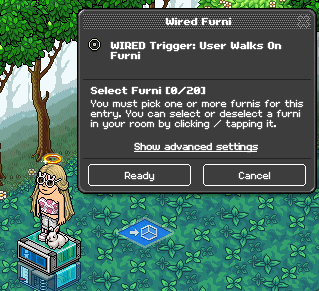
In both rooms, place a WIRED Trigger: User Walks On Furni and select the Room Linker that users will step on to trigger teleportation.
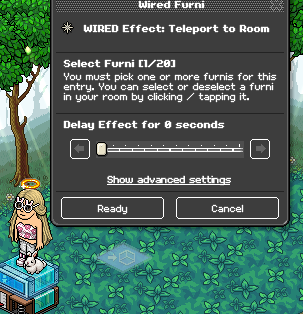
Place a WIRED Effect: Teleport to a Room in both rooms and select the Room Linker as the destination to complete the teleportation setup.

With the WIRED Effect: Teleport to a Room, combined with the Room Linker, you can create a smooth teleportation systems for events, mazes, badge events, or just linking different rooms.
This setup gives you full control over how users move through your rooms.
The Room Linker acts like a normal teleporter but only works when paired with the WIRED Effect: Teleport to a Room. You’ll need to place one in both rooms you're connecting. It’s available in the Catalogue for 2 credits per pair and must be bought separately, Builder’s Club members get the WIRED Effect for free!
You can also enhance your setup with Conditions, Variables, and Add-ons — for example, triggering only if a user belongs to a group, or limiting how often the teleport can activate during events.
What you will need (in both rooms):
-
- 1x Room Linker (2 credits per pair in the Catalogue)
- 1x WIRED Effect: Teleport to a Room
- 1x WIRED Trigger: User Walks On Furni
Step 1
Place the Room Linker in both rooms you want to link.
Step 2
In both rooms, place a WIRED Trigger: User Walks On Furni and select the Room Linker that users will step on to trigger teleportation.
Step 3
Place a WIRED Effect: Teleport to a Room in both rooms and select the Room Linker as the destination to complete the teleportation setup.
Teleportation GIF
 Rainbow 1 year ago
 Dani 1 year ago