
Ever wondered when you walk in a room and you see the current time? We'll I'm going to show you how it's wired!
WIRED: Variable: Context Variable
Wired Stack:
WIRED Trigger: Repeat Effect
WIRED Effect: Give Variable
WIRED Effect: Change Variable Value
WIRED Effect: Change Variable Value
WIRED Effect: Change Variable Value
WIRED Effect: Change Variable Value
WIRED Effect: Change Variable Value
WIRED Add-on: Execute In Order
Simply follow both of the GIFs below to set your settings on the wired for the real time clock. Make sure to follow the GIF to make sure each wired box is set to the correct specifications so your wired will work.


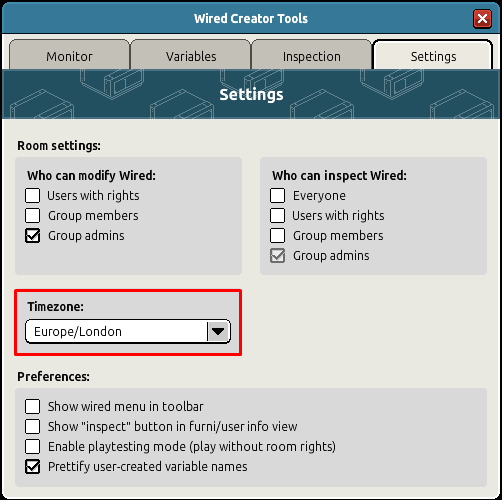
Now to change your timezone say :wired this will open the wired settings menu.
What you will need:
First Stack:WIRED: Variable: Context Variable
Wired Stack:
WIRED Trigger: Repeat Effect
WIRED Effect: Give Variable
WIRED Effect: Change Variable Value
WIRED Effect: Change Variable Value
WIRED Effect: Change Variable Value
WIRED Effect: Change Variable Value
WIRED Effect: Change Variable Value
WIRED Add-on: Execute In Order
Creating the real time clock GIF 1
Simply follow both of the GIFs below to set your settings on the wired for the real time clock. Make sure to follow the GIF to make sure each wired box is set to the correct specifications so your wired will work.
Setting your timezone
Now to change your timezone say :wired this will open the wired settings menu.
 KBJMED 1 year ago
 Dani 1 year ago