
Are you tired of using rollers to make queues for your events room? Look no further, with the recent wired updates on Habbo you can make a queue that matches the rest of your room, without the hassle of rollers!
Stack One
1x Wired Trigger: Repeat Effect
1x Wired Effect: Move and Rotate Furni
1x Wired Effect: Send Signal
1x Wired Add-on: Carry Users
Stack Two
1x Wired Trigger: Receive Signal
1x Wired Effect: Match Furni to Position & State
1x Wired Add-on: Movement Physics
Furni
1x Small Wired Antenna OR 1x Wired Antenna
As many Invisible Blocks as you need (You may substitute this for any furniture)
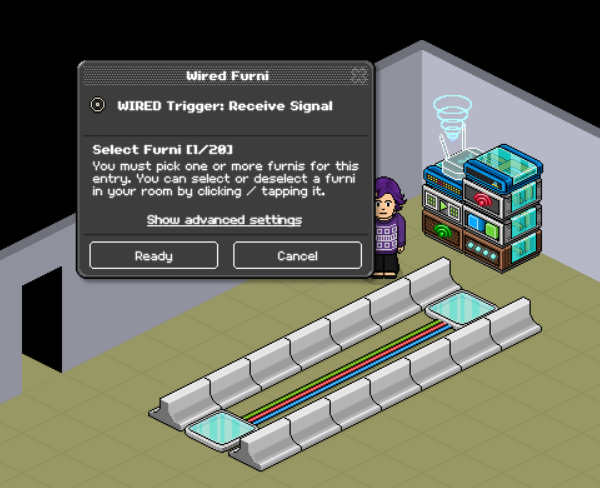
Stack the wired boxes mentioned above into the stacks they are listed in. Edit your "Wired Trigger: Receive Signal" and select the wired antenna you opted to use. Once you have done this press "Ready." to save your changes.
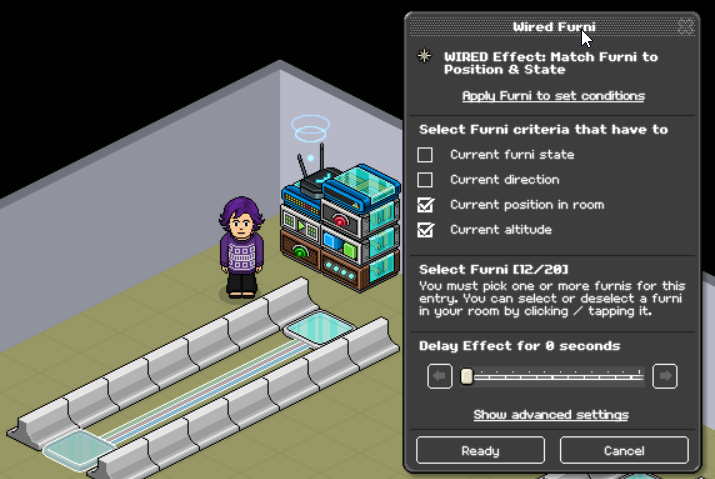
Edit your "Wired Effect: Match Furni to position & State" and select the invisible blocks (or your selected furni) in your queue, tick the options "Current position in room" and "Current altitude". Once you have done this, you can press Ready to save your changes. This allows the items to be reset and ready for the next person to step on it.
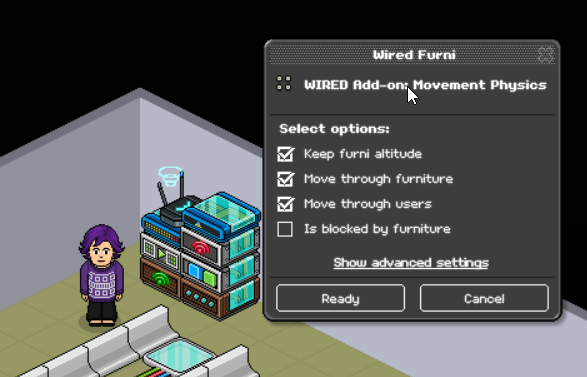
Edit the "Wired Add-on: Movement Physics", once in the wired box select the "Keep furni altitude", "Move through furniture" and "Move through users" options. This allows the furniture to return to its original spot even if a user has been moved into the area where it would go.
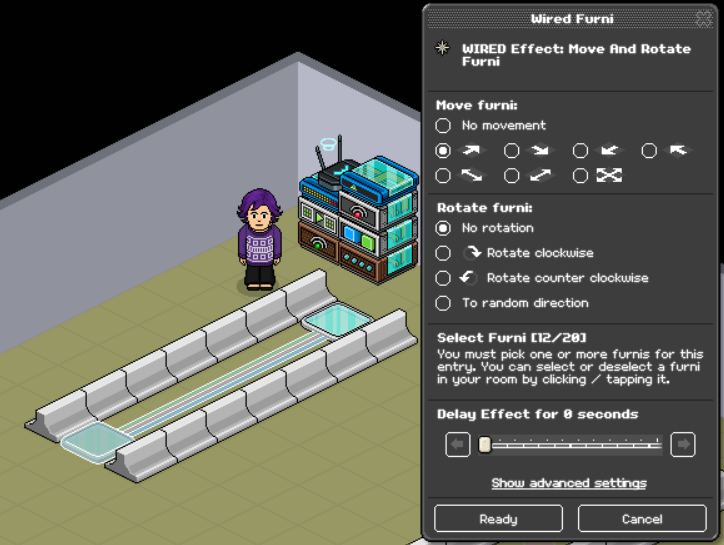
Edit the "Wired Effect: Move and Rotate Furni" and then select all the invisible tiles (or your selected furniture) that you will be using to move users along in the queue. Select the arrow for which direction the invisible blocks should be moving so the user can advance forward in the queue.
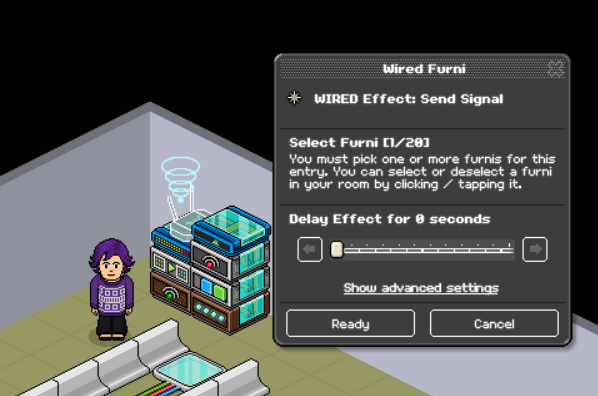
Edit the "Wired Effect: Send Signal", once in the wired box select the Wired Antenna that you used and press the ready button. This will allow it to send a signal to the stack so that the wired will return the tiles to their original spot allowing the queue to function.
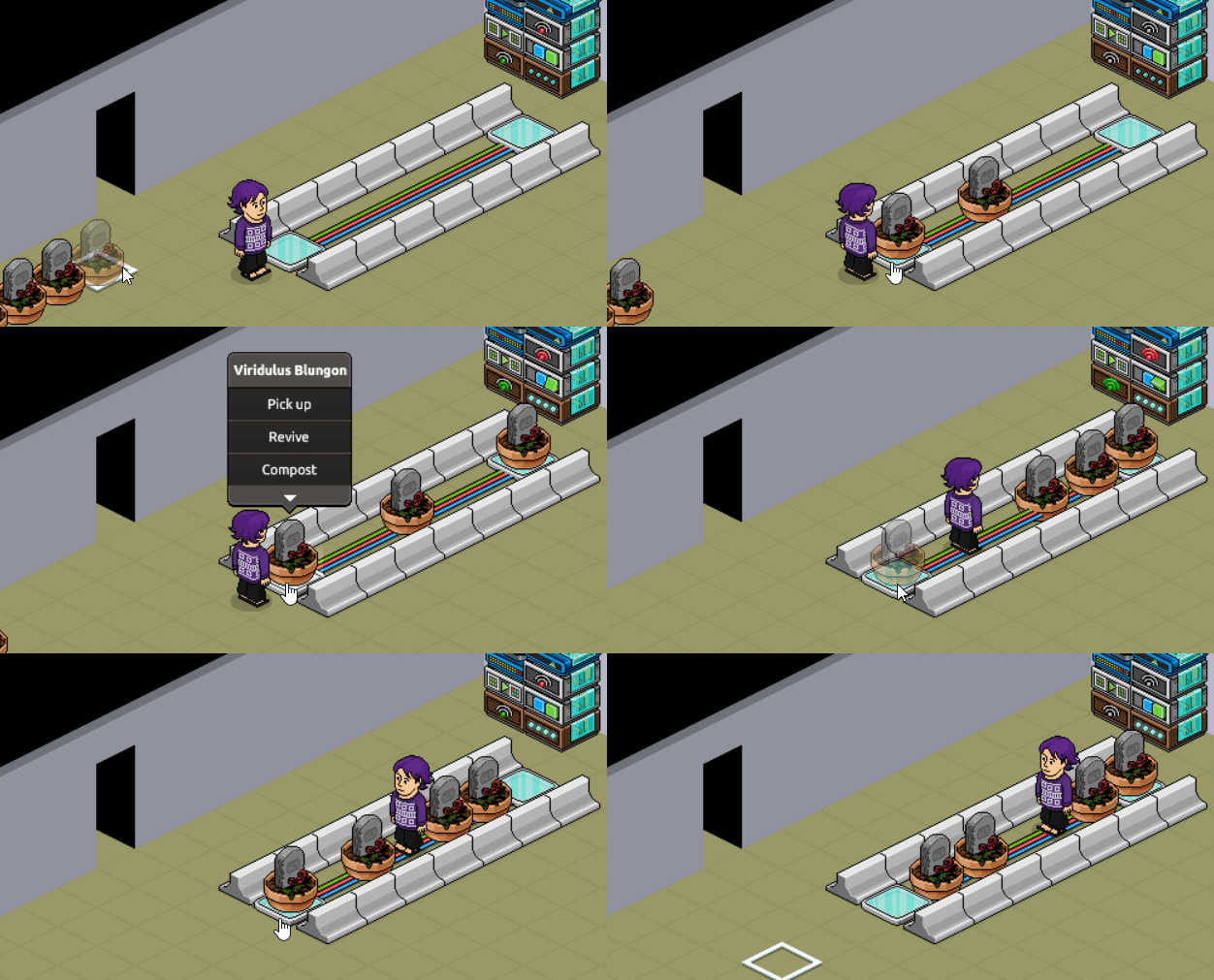
If you've followed the steps correctly you will be good to go for using this wired in your games rooms to have a simpler queue. You can find a GIF below of the intended final results.
What you will need
Stack One
1x Wired Trigger: Repeat Effect
1x Wired Effect: Move and Rotate Furni
1x Wired Effect: Send Signal
1x Wired Add-on: Carry Users
Stack Two
1x Wired Trigger: Receive Signal
1x Wired Effect: Match Furni to Position & State
1x Wired Add-on: Movement Physics
Furni
1x Small Wired Antenna OR 1x Wired Antenna
As many Invisible Blocks as you need (You may substitute this for any furniture)
Step 1
Stack the wired boxes mentioned above into the stacks they are listed in. Edit your "Wired Trigger: Receive Signal" and select the wired antenna you opted to use. Once you have done this press "Ready." to save your changes.
Step 2
Edit your "Wired Effect: Match Furni to position & State" and select the invisible blocks (or your selected furni) in your queue, tick the options "Current position in room" and "Current altitude". Once you have done this, you can press Ready to save your changes. This allows the items to be reset and ready for the next person to step on it.
Step 3
Edit the "Wired Add-on: Movement Physics", once in the wired box select the "Keep furni altitude", "Move through furniture" and "Move through users" options. This allows the furniture to return to its original spot even if a user has been moved into the area where it would go.
Step 4
Edit the "Wired Effect: Move and Rotate Furni" and then select all the invisible tiles (or your selected furniture) that you will be using to move users along in the queue. Select the arrow for which direction the invisible blocks should be moving so the user can advance forward in the queue.
Step 5
Edit the "Wired Effect: Send Signal", once in the wired box select the Wired Antenna that you used and press the ready button. This will allow it to send a signal to the stack so that the wired will return the tiles to their original spot allowing the queue to function.
You're good to go!
If you've followed the steps correctly you will be good to go for using this wired in your games rooms to have a simpler queue. You can find a GIF below of the intended final results.
 jasean94 3 years ago
 chasiu 3 years ago
 kitten 3 years ago
 Kate 3 years ago
 Rotating 3 years ago
 Rainbow 3 years ago