
Are you looking for an easy way to clear all players from your games area? Tired of having countless objects moving and hoping for a collision? You can now use Wired to clear users from your games area by simply saying a command!
1x Wired Trigger: User Says Keyword
1x Wired Condition: Group Member
1x Wired Selector: Users In Area
1x Wired Effect: Teleport To Furni
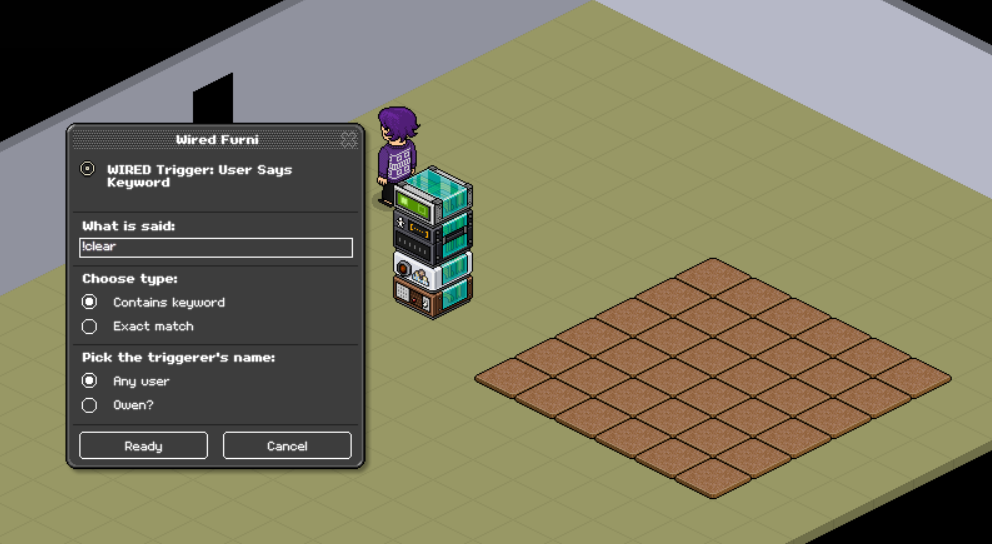
Stack the wired boxes mentioned above. Edit your "Wired Trigger: User Says Keyword" by entering the command you want your hosts to say to clear the area. Once you have done this press "Ready." to save your changes.
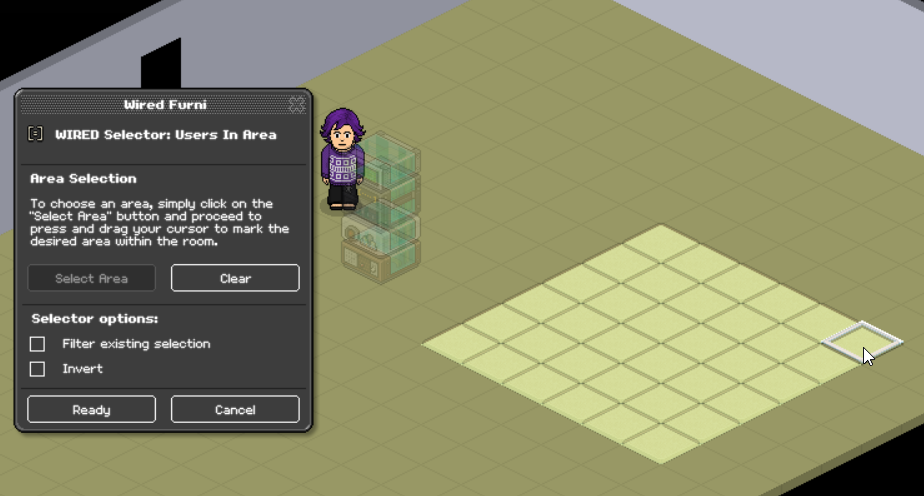
Use your "Wired Selector: Users in Area" and press the "Select Area" button. This will change the furniture in the room to a translucent state making selecting tiles easier. Select the corner where you want the area to start and drag your mouse to the other corner, once you stop holding down it will consider the selected area as the value to save. Press ready once you have done this.
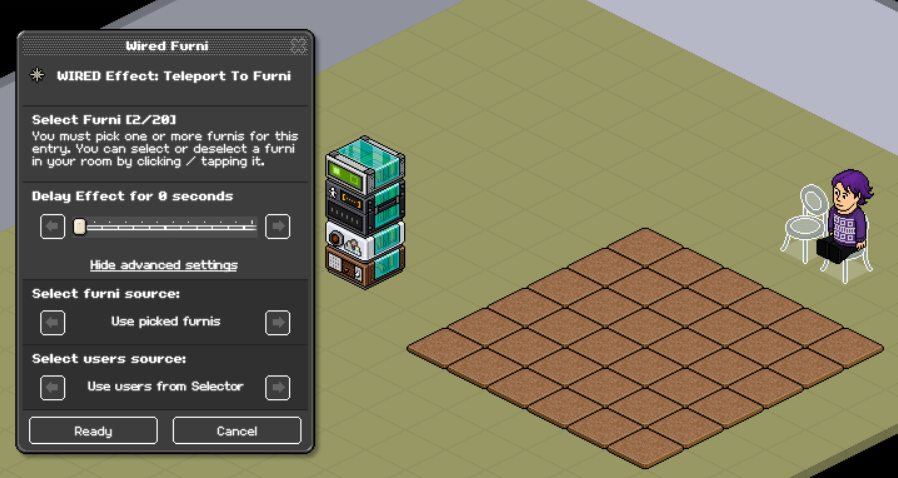
Use your "Wired Effect: Teleport To Furni" and select the furniture you want to teleport the users to before you press Ready you need to press "Show Advanced Settings" and change the value of "Select users source" to "Use users from Selector". Once you have done this you can press the Ready button, this will make sure it teleports the users in the area rather than the person saying the command.
What you will need
1x Wired Trigger: User Says Keyword
1x Wired Condition: Group Member
1x Wired Selector: Users In Area
1x Wired Effect: Teleport To Furni
Step 1
Stack the wired boxes mentioned above. Edit your "Wired Trigger: User Says Keyword" by entering the command you want your hosts to say to clear the area. Once you have done this press "Ready." to save your changes.
Step 2
Use your "Wired Selector: Users in Area" and press the "Select Area" button. This will change the furniture in the room to a translucent state making selecting tiles easier. Select the corner where you want the area to start and drag your mouse to the other corner, once you stop holding down it will consider the selected area as the value to save. Press ready once you have done this.
Step 3
Use your "Wired Effect: Teleport To Furni" and select the furniture you want to teleport the users to before you press Ready you need to press "Show Advanced Settings" and change the value of "Select users source" to "Use users from Selector". Once you have done this you can press the Ready button, this will make sure it teleports the users in the area rather than the person saying the command.
 Kate 3 years ago
 Rotating 3 years ago
 Kitty 3 years ago